How to play
How to play Tower Rush in Pakistan: step-by-step guide
Updated 22 October 2026 · Data: Galaxsys, in-game rules, public demo
How to play Tower Rush in Pakistan starts with knowing what the BUILD and CASHOUT buttons do. This guide walks through opening the game, setting the bet, placing floors, reading odds and deciding when to stop. Tower Rush is a Galaxsys crash-style building game, and access, currency and any payment features depend on the platform hosting it.
01 · Rules
Before you open Tower Rush
Tower Rush is a Galaxsys Fast Game, also described as a Turbo Game. It is a crash-style building game, not a reel slot: a crane drops floors onto a tower, and each successful placement can change the current round amount according to that floor’s odds. The tower can keep growing, but a collapse can end the round.
In Pakistan, check the legal and access context before using any third-party gaming platform. Gambling is prohibited under the Prevention of Gambling Act, 1977 and provincial equivalents; there is no licence for online casinos in Pakistan. The Pakistan Telecommunication Authority blocks gambling and betting websites and apps. The Cabinet Division told the National Assembly in August 2025 that 184 such websites and apps had been blocked. This guide does not assess the legality of a particular platform. See the Pakistan legal status page for the country context.
Tower Rush itself does not have an account system. A gaming platform that offers Galaxsys games handles registration and login. There is no official standalone Tower Rush earning app from Galaxsys; the game is HTML5 and runs in a mobile browser within a platform, or in that platform’s own app. Check the app and APK guide before installing anything advertised as an official Tower Rush APK. The public demo guide explains how to find the Galaxsys demo.
02 · Rules
How to play Tower Rush: opening the game
Use this checklist to get from the game screen to your first round:
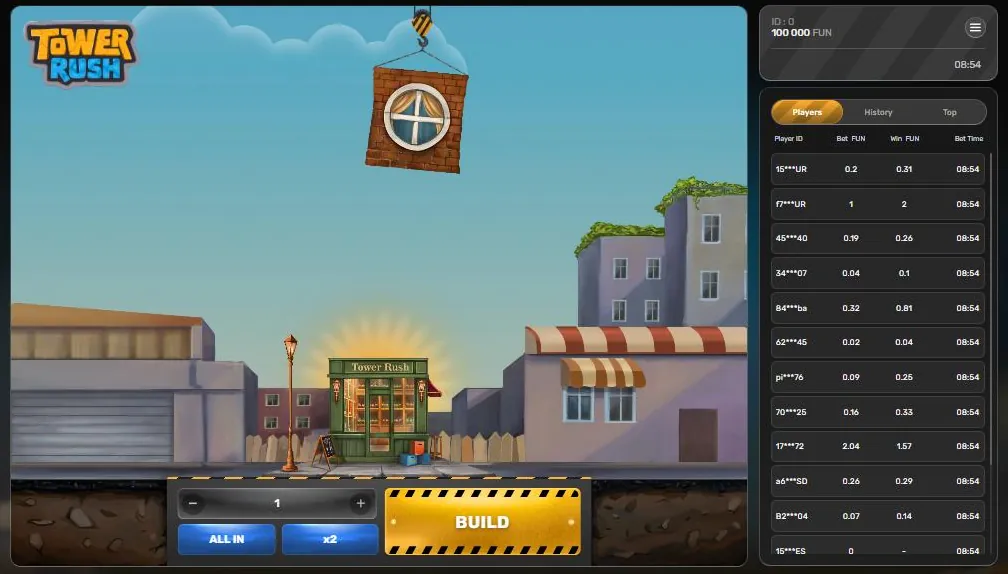
- Open the game through its hosting platform. If you are using a browser, check that the game name and Galaxsys branding are shown in the game interface. Tower Rush is supplied by Galaxsys; the platform, not the game, manages your account.
- Choose the demo or platform mode available to you. The public Galaxsys demo uses “Fun” as its currency. Demo settings and platform versions can differ, so read the in-game Rules rather than assuming every screen has the same settings.
- Review the controls and Rules before starting. Open the menu and select Rules. Check the stated version information, RTP and any rules about bonus floors, disconnects or malfunctions.
- Set the bet using the bet controls. The bet control is shown before you build. The minus and plus buttons adjust it; x2 doubles the displayed bet, while ALL IN selects the full available balance. Verify the displayed setting before pressing BUILD.
- Press BUILD once. A floor hangs from the yellow-and-black striped crane hook and drops onto the tower. If it stands, the game applies that floor’s odds to the current round amount.
- Choose CASHOUT or BUILD again. CASHOUT credits the amount shown on the button to the platform balance. BUILD risks the accumulated amount on another floor. Read the displayed amount and floor odds before making this choice.
The city-street scene includes a “Wine Store” building at the base. Treat the animation as the game display: the key information for a decision is the current amount, the floor’s odds and whether the floor stands or collapses.
Interface
Tower Rush screen: 7 key elements
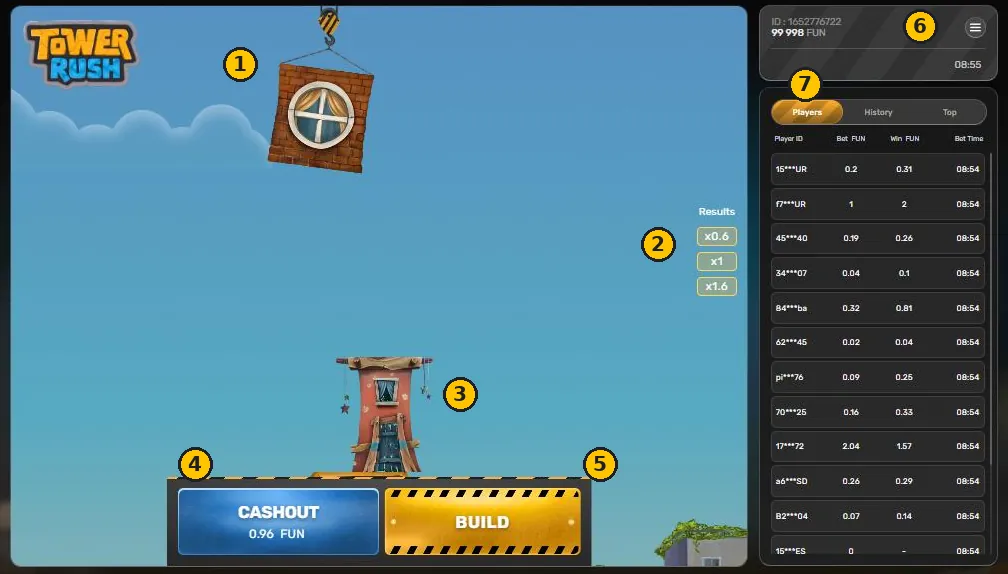
- Floor and crane The next floor hangs from the crane hook. After BUILD it drops onto the tower.
- Results Odds of every floor that stood, newest on top. Odds can be below x1, for example x0.6.
- Tower Floors already placed. If a new floor fails, the tower collapses and the round is lost.
- CASHOUT Shows the current accumulated amount. Press it to credit that amount to the balance.
- BUILD Places the next floor. The odds of the new floor multiply the total.
- Balance, ID and menu Balance (Fun in the demo), player ID and the Home, Sound, Rules menu.
- Players, History, Top Bets of other players, your round history and the biggest wins.
03 · Rules
The BUILD or CASHOUT decision
After each successful floor, you have a choice. CASHOUT ends the round and credits the accumulated amount shown. BUILD continues the tower, applying another floor’s odds if it stands. There is no requirement to build again after a successful placement; you can cash out at that point.
| Screen item | What to check |
|---|---|
| BUILD | Starts the next floor placement and puts the accumulated round amount at risk. |
| CASHOUT | Ends the round and credits the currently displayed amount to the platform balance. |
| Current amount | The amount currently available to cash out, subject to the game’s rules. |
| Floor odds | The multiplier for the floor being placed; it may be below x1. |
| Results column | A record of floor odds, useful for checking the sequence in the round. |
A practical verification step is to pause after every successful floor and read both the current amount and the next decision. Do not assume that a taller tower always means a larger cashout: a successful floor below x1 can reduce the accumulated amount. Building further is a new risk, not a guaranteed way to recover a lower multiplier.
Worked multiplier examples
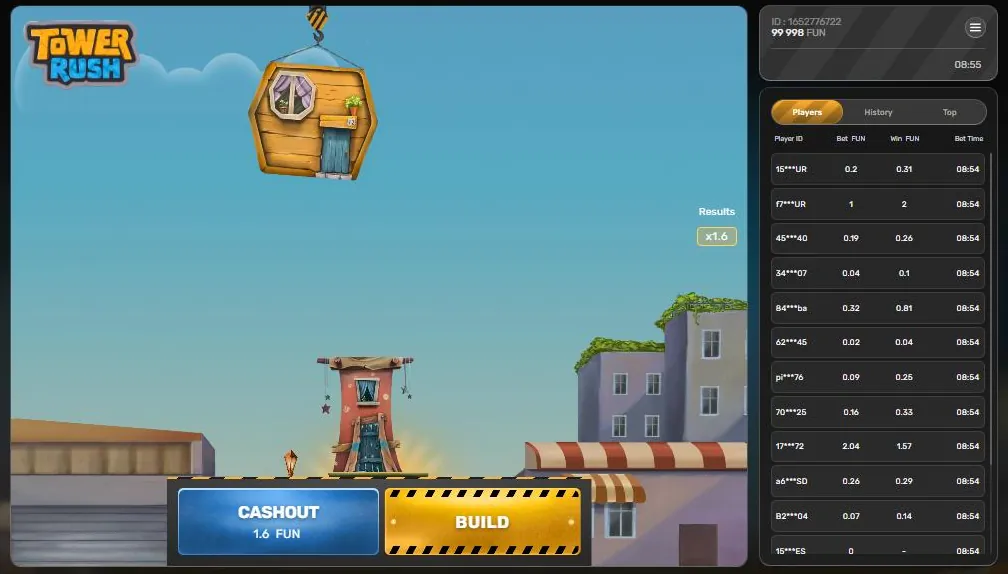
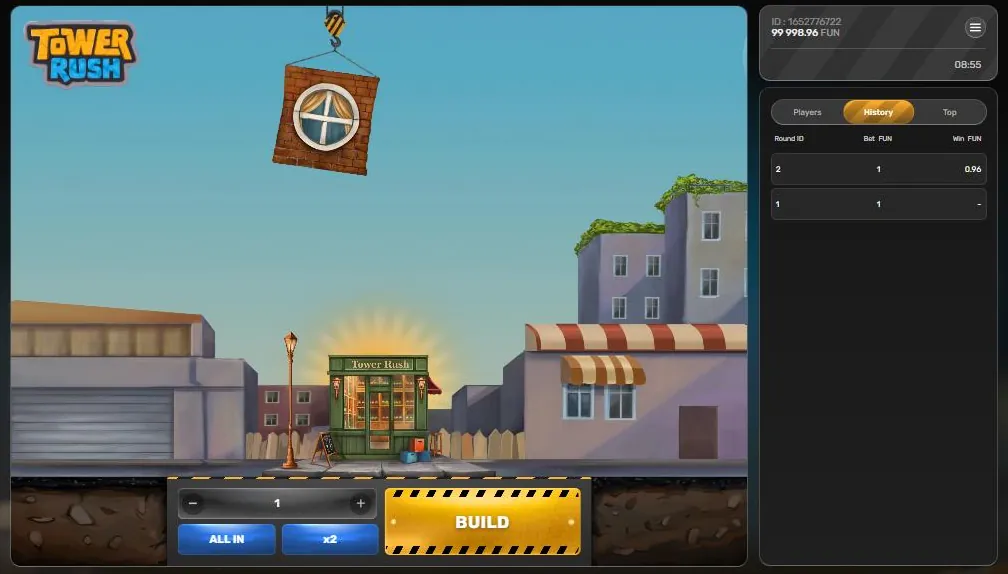
These examples use multipliers only, not currency or bet amounts. If the sequence is x1.6, then x1, then x0.6, the combined multiplier is x1.6 × x1 × x0.6 = x0.96. The first floor increases the multiplier, the second leaves it unchanged, and the third reduces it. If the round is cashed out at that point, the displayed result is x0.96 of the starting bet.
For another example, if a current round multiplier is x5 and a successful next floor has odds of x2, the new multiplier is x10. The game multiplies the accumulated amount by each next floor’s odds; it does not simply add the odds together. Check the in-game display after every placement because the actual floor odds can vary.
04 · Rules
Tower Rush odds, collapse and bonus floors
Each floor has its own odds. A successful floor multiplies the accumulated amount by those odds, including when the odds are below x1. If a floor collapses, the round is lost unless a Frozen Floor has already protected the current accumulated amount. The RTP and fairness guide explains the stated RTP and provably fair feature; check the Rules in the version you are playing because RTP depends on the platform’s chosen version.
Bonus floors can look like ordinary floors until they are placed. The game rules describe up to three types:
- Frozen Floor: freezes the current accumulated amount so it is paid even if the tower later collapses. You may continue and cash out a higher amount; the rules give the example of freezing at x5 and cashing out at x10. Only one freeze is available per round. After it occurs, no other bonus floors appear, and subsequent floors have odds of at least x1.5 or collapse at x0.
- Temple Floor: triggers one automatic spin on a wheel with ten sections: x1.5, x1.5, x2, x2, x3, x3, x5, x5, x7 and Freeze. The result multiplies the current win or freezes it. Temple Floors can appear more than once in a round.
- Triple Build: automatically builds three floors, each with odds of at least x1. It can appear more than once in a round.
Read the bonus floors guide for a closer explanation. Do not assume that a bonus floor is visible in advance: according to the game rules, these floors look normal until they have been placed.
05 · Rules
Bet controls and the Results column
The bet controls change the selected bet before a round starts. The minus and plus buttons adjust the displayed setting in steps; x2 doubles the current setting; ALL IN selects the full available balance. These are controls, not separate game modes. Verify the display after using any control, especially ALL IN or x2, before pressing BUILD. The game’s Rules and the platform determine which settings are available.
During play, use the Results column to review the odds recorded for the floors. It can help you verify the sequence, but it does not predict the next floor or guarantee a result. Keep it separate from the current cashout value: the Results column records floor odds, while CASHOUT shows the amount currently available to collect under the game rules.
The balance and player ID appear at the top right. The side tabs are Players, History and Top. These provide different views of player or round information; they do not change the odds of your current floor. If you are unsure what a figure represents, open Rules and compare it with the current amount shown on CASHOUT rather than treating a tab as a promise of a future result.
06 · Rules
Rules, disconnection and malfunctions
Open the menu and select Rules to check the terms attached to the game version on screen. The menu also lists Home and Sound. Before starting, confirm how the game describes successful floors, bonus floors and the displayed RTP. The official Galaxsys page describes RTP as 96.2%–97.6%, while in-game rules state 96.17%–97%. The version selected by the hosting platform affects which RTP applies, so use the in-game Rules for the version you have opened. Galaxsys lists provably fair technology as a feature; this does not make a particular round predictable.
The stated disconnection rule is that, if you are inactive, the round ends after one hour and a registered win is credited. Do not rely on leaving a round open as a way to hold a decision indefinitely. If the connection drops, return to the same game through the platform and check the recorded result and balance rather than starting another round immediately.
The malfunction rule states that all pays and plays are void. If the screen freezes, a result appears inconsistent or the platform reports a technical fault, stop and check the Rules and the platform’s own support process. Do not assume a displayed animation alone settles a disputed result. Operator-provided Free Bet and Free Amount are platform features mentioned in the Rules, not Tower Rush game bonuses; their terms are set by the platform.
07 · Rules
Pakistan checklist before a session
Use this final check before opening a round:
- Confirm you are on a platform that is actually offering the Galaxsys game, not an unrelated download or “earning game” claiming to be official.
- Check the legal position and local access restrictions. Search terms such as “tower rush in pakistan”, “tower rush pkr”, “pakistan withdrawal” and “official app” do not establish that an app or service is official, available or lawful.
- Remember that currencies and withdrawals depend entirely on the platform. Tower Rush has no official earning app, and the game itself does not set platform withdrawal methods.
- Read the in-game Rules and verify the RTP for the version selected. Use the Pakistan guide for related country information, and the responsible gaming page for support and safer-play information.
- Set a limit you can afford to lose, and stop if play is causing distress. The game is for adults aged 18 and over. In Pakistan, Umang lists a mental health helpline at umang.com.pk; emergency services can be reached on 1122.
For the developer’s game information, visit the official Galaxsys Tower Rush page.
FAQ
Questions about Tower Rush
How to play Tower Rush in Pakistan?
Open Tower Rush through a platform that offers the Galaxsys game, read the in-game Rules and set the displayed bet before pressing BUILD. After a floor stands, choose CASHOUT to end the round or BUILD to risk the accumulated amount on another floor. Pakistan’s legal and access context applies independently of the game.
What are the Tower Rush rules for cashout?
CASHOUT credits the amount shown on the button and ends the round. BUILD places another floor, whose odds multiply the accumulated amount if it stands. A collapse loses the round unless a Frozen Floor has protected the current amount.
Can Tower Rush odds be below x1?
Yes. A successful floor can have odds below x1 and reduce the accumulated amount. For example, x1.6 × x1 × x0.6 equals x0.96, so a successful sequence does not always increase the result.
What happens if Tower Rush disconnects?
The stated rule says that an inactive round ends after one hour and a registered win is credited. If the connection drops, return through the same platform and check the recorded result and balance. Malfunctions void all pays and plays under the game rule.
Is there an official Tower Rush APK or earning app?
No official standalone Tower Rush APK from Galaxsys was found. Tower Rush is an HTML5 game that runs in a mobile browser within a gaming platform or in that platform’s app, and the game has no separate account system. Treat unofficial APK or earning-app claims with caution.