How to play
How to play Tower Rush: rules and first cashout
Updated 22 October 2026 · Data: Galaxsys, in-game rules, public demo
How to play Tower Rush is easier to follow when you treat each floor as a new decision, not a guaranteed increase. Choose a bet, build a floor, check the displayed odds and decide whether to cash out or continue. This guide explains the controls, multiplier maths, collapse risk and key rules, with practical steps for readers in the Philippines.
01 · Rules
Tower Rush rules at a glance
Tower Rush by Galaxsys is a fast, crash-style building game, not a reel slot. A crane drops floors onto a tower. If a floor lands, its odds are applied to the running result. You can then take the displayed amount with CASHOUT or risk it by choosing BUILD again. If the tower collapses, the round is lost unless a Frozen Floor has protected the current amount.
| Term | What it means |
|---|---|
| BUILD | Drops the next floor and applies its odds if it stands. |
| CASHOUT | Ends the round and credits the displayed accumulated amount to the balance. |
| Floor odds | The multiplier for that floor; it can be below x1. |
| Collapse | Ends the round without a payout, unless the amount has been frozen. |
The official idea is to build a chain of floors: the tower can continue, and higher floors can bring higher odds. That does not mean every floor raises the result or that a longer tower is safer. Read the in-game rules before playing, and see our Tower Rush RTP and fairness guide for the difference between published RTP figures and an individual round.
02 · Rules
How to play Tower Rush, step by step
Follow this sequence from opening the game to your first cashout:
- Open Tower Rush from a gaming platform. The game itself does not have a separate account. Login and registration are handled by the platform offering it. In the Philippines, check that platform's exact domain against PAGCOR's lists; a PAGCOR logo on a page is not proof of registration or approval.
- Review the game rules before starting. Open the menu and select Rules. Check the version's terms, including the odds and any available bonus-floor details. RTP settings can vary by platform version.
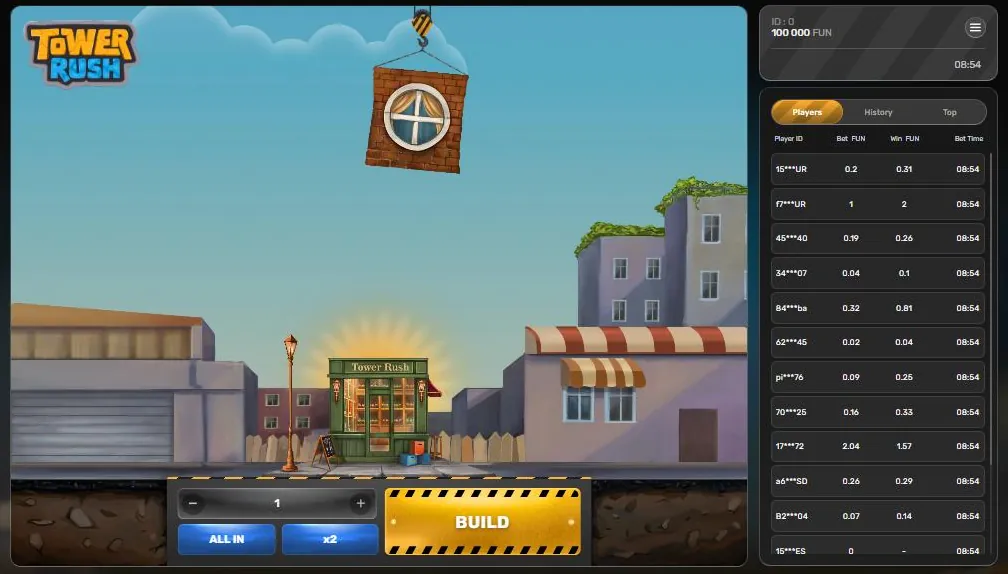
- Set the bet using the controls. The bet control is beside the ALL IN, minus, plus and x2 buttons. Confirm the value shown before building. ALL IN uses the available balance for the bet, so it can expose the whole balance to one round. The minus and plus controls adjust the bet, while x2 doubles its current setting. These controls do not change the odds or make a floor more likely to stand.
- Press BUILD. A floor hangs from the crane hook and drops onto the tower. If it lands and stands, the displayed floor odds apply to the current result. The Results column records floor odds.
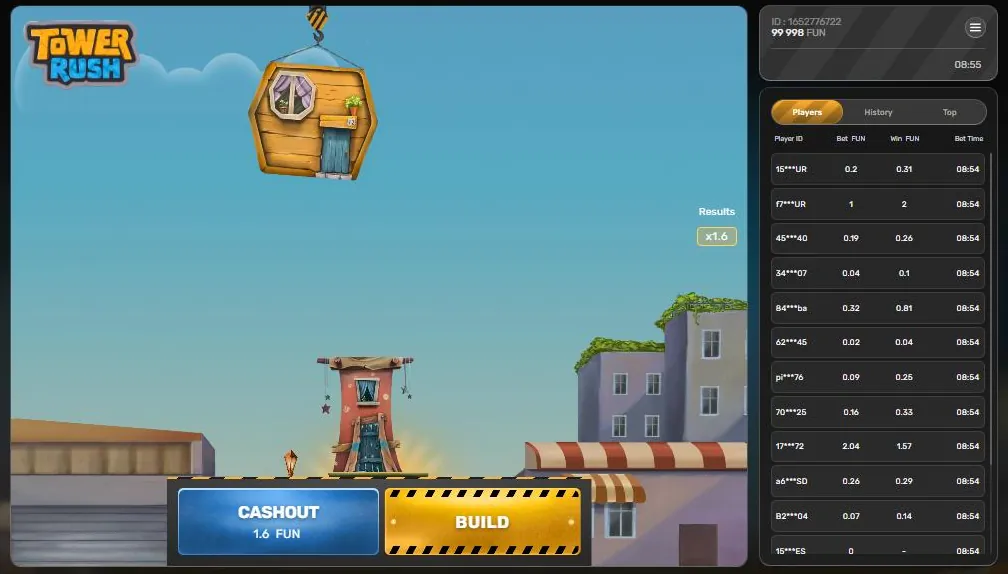
- Check the CASHOUT display. It shows the current accumulated amount. Compare that amount with the result you are willing to leave in play; do not assume the next floor will improve it.
- Choose CASHOUT or BUILD. CASHOUT ends the round and credits the displayed result to the balance. BUILD starts the next step in the same round, applying another floor's odds if it stands. A collapse can end the round before you cash out.
For a lower-pressure introduction, use the Tower Rush demo. The public demo is available on desktop and mobile, and uses Fun currency. Demo rules list limits in Fun; those are demo settings and should not be treated as real-play terms. The demo interface is in English.
Interface
Tower Rush screen: 7 key elements
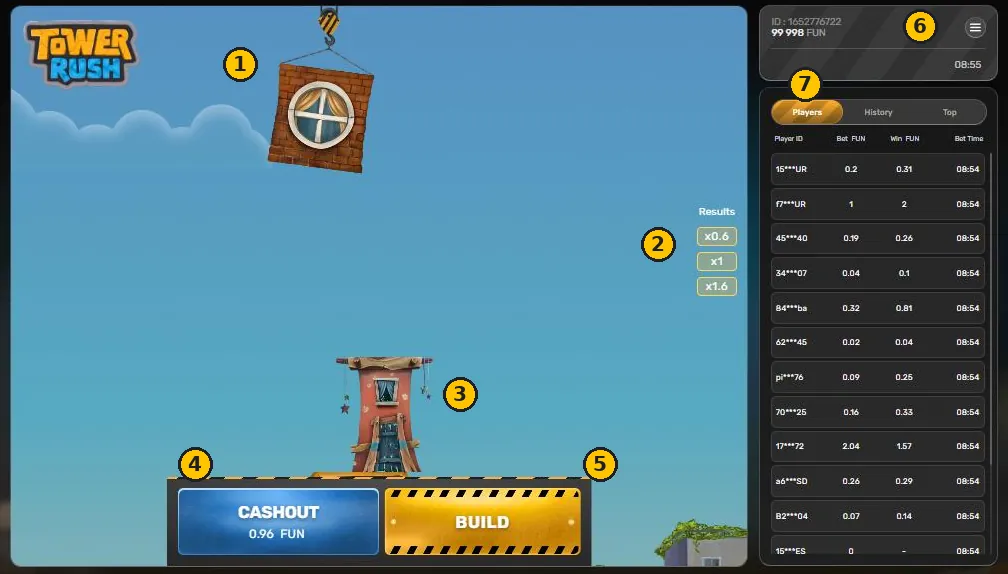
- Floor and crane The next floor hangs from the crane hook. After BUILD it drops onto the tower.
- Results Odds of every floor that stood, newest on top. Odds can be below x1, for example x0.6.
- Tower Floors already placed. If a new floor fails, the tower collapses and the round is lost.
- CASHOUT Shows the current accumulated amount. Press it to credit that amount to the balance.
- BUILD Places the next floor. The odds of the new floor multiply the total.
- Balance, ID and menu Balance (Fun in the demo), player ID and the Home, Sound, Rules menu.
- Players, History, Top Bets of other players, your round history and the biggest wins.
03 · Rules
The BUILD or CASHOUT decision
This is the main decision in Tower Rush. CASHOUT takes the amount currently shown and ends the round. BUILD keeps that result at risk: the next floor may stand and change the multiplier, or collapse and lose the round's unprotected result. There is no rule that says a player must build a particular number of floors.
A practical check before each BUILD is: “Would I accept losing the amount currently shown?” If not, cashing out is the available way to end the round with that displayed result. If you continue, do so knowing the next floor can reduce the accumulated amount even when it stands, because floor odds can be below x1. Setting a personal stop point before starting can help prevent decisions made in response to a near miss or a rising tower.
04 · Rules
How Tower Rush odds multiply
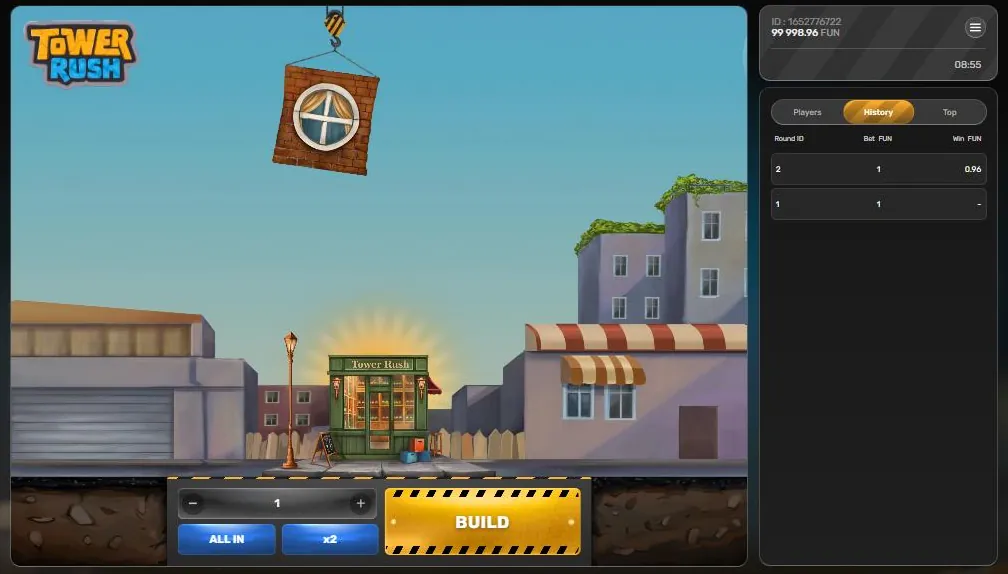
Each successful floor multiplies the accumulated result; the odds are not added together. For example, the multiplier sequence x1.6 × x1 × x0.6 = x0.96. Although all three floors stand, the final result is 0.96 of the original bet. A successful floor with odds below x1 reduces the result. A floor at x1 leaves it unchanged; a floor above x1 raises it, before any later floors are applied.
More examples, using multipliers only:
- x2 × x1.5 = x3 accumulated multiplier.
- x1.6 × x0.6 = x0.96 accumulated multiplier.
- x1.5 × x2 × x0.6 = x1.8 accumulated multiplier.
These are illustrations of the multiplication rule, not predictions of what a round will produce. The next floor's odds and whether it stands are uncertain. The current CASHOUT display is the amount available to take at that point; do not estimate it by adding the floor odds.
Bonus floors can affect the sequence. A Frozen Floor locks the current accumulated amount so it is paid even if the tower later collapses; continuing can still produce a higher cashout. Only one freeze can occur in a round, and after it appears no other bonus floors appear. Later floors after a freeze have odds of at least x1.5 or collapse at x0. A Temple Floor triggers one automatic wheel spin, with results including multipliers or Freeze; its result multiplies the current win or freezes it. Triple Build automatically builds three floors, each with odds of at least x1. These types can appear more than once in a round, except for the one-freeze limit. See the bonus floors guide for these mechanics in more detail.
05 · Rules
Collapse, Results and game controls
A collapse means the tower does not support the next floor and the round ends. Without a Frozen Floor, the round is lost. The game does not offer a way to undo a BUILD after the floor begins to drop, so make the cashout decision before pressing it. A frozen amount is protected under the stated rule, but continuing after a freeze still risks the additional result.
The Results column shows the odds of floors in the round. Use it to review the floor multipliers, not as a promise about the next drop. The side tabs have separate purposes: Players displays player information, History shows past results, and Top presents top results. These records do not predict upcoming odds or change the chance of a collapse.
The menu contains Home, Sound and Rules. Use Rules to check the terms attached to the particular game version. The balance and player ID appear at the top right. Before confirming any action, check that the selected bet and current display are the ones you intend to use.
06 · Rules
Disconnection, malfunction and version checks
The stated disconnection rule says that if the game is inactive, the round ends after one hour and a registered win is credited. Do not treat this as a substitute for pressing CASHOUT: the rule concerns an inactive round and does not remove the risk while you are still building. If a connection issue occurs, check the round record and the platform's applicable terms.
The malfunction rule says that all pays and plays are void. If the display or result appears inconsistent, avoid making assumptions about a payout; check the game record and contact the platform through its support process. This guide cannot determine how a specific platform will resolve an account query.
Galaxsys lists RTP of 96.2%–97.6% on its official page, while the in-game rules state 96.17%–97%. RTP depends on the version selected by the platform, so use the Rules menu in the game you opened. RTP is a long-run statistical measure, not a guarantee for one session. The developer also lists provably fair technology as a feature; details can depend on the implementation available in the game version. The official Tower Rush page provides the developer's game information.
07 · Rules
Philippines: check the platform, not just the game
PAGCOR regulates gambling in the Philippines. Only PAGCOR-licensed or registered platforms may legally offer online games to players in the country. This guide does not confirm that Tower Rush is approved on any particular platform. Verify the exact platform domain using PAGCOR's lists; a logo or a search result is not enough. Read our Philippines legal status page for more context.
The minimum age is 21. Government officials and employees, AFP and PNP members, and people on the National Database of Restricted Persons are barred from gambling. Tower Rush is HTML5 and can run in a mobile browser within a gaming platform or its app; Galaxsys does not have an official standalone Tower Rush APK. See app and APK information before installing anything claiming to be a separate game app.
Payment options depend on the platform. GCash Help Center states that licensed gaming top-up and withdrawal services were removed effective 16 August 2025. BSP memorandum M-2025-029, dated 14 August 2025, instructed BSP-supervised e-wallets to remove in-app links to gambling sites. Do not assume a payment method is available because an old guide or platform page mentions it.
If gambling is causing harm, stop and seek support. The National Problem Gambling Helpline provides help, while PAGCOR offers self-exclusion and responsible gaming information. You can also read our responsible gaming guide before deciding whether to play.
FAQ
Questions about Tower Rush
How do you play Tower Rush?
Set a bet, press BUILD and check the floor odds if it stands. Choose CASHOUT to end the round with the displayed result, or BUILD again and risk a collapse.
What are the Tower Rush rules for cashout?
CASHOUT credits the accumulated amount shown on the button and ends the round. If you choose BUILD instead, the next floor's odds are applied if it stands, but a collapse can end the round.
Can Tower Rush odds go below x1?
Yes. A floor below x1 reduces the accumulated result even if it stands. For example, x1.6 × x1 × x0.6 gives an accumulated multiplier of x0.96.
What happens when the Tower Rush tower collapses?
The round is lost unless a Frozen Floor has locked the current accumulated amount. The frozen amount is paid even if the tower later collapses, under the stated game rule.
Is Tower Rush legal to play in the Philippines?
Only PAGCOR-licensed or registered platforms may legally offer online games to players in the Philippines, and this guide does not confirm approval for a specific platform. Check the exact platform domain in PAGCOR's lists and note that the minimum age is 21.