Login
Tower Rush login and registration guide for India
Updated 22 October 2026 · Data: Galaxsys, in-game rules, public demo
Tower Rush login is handled by the gaming platform that hosts Galaxsys games, not by a separate Tower Rush account. This guide explains registration, verification, mobile and desktop access, account security and platform withdrawal steps. In India, real-money play falls under the online money games ban, so check the current legal position before taking any action.
01 · Account
How Tower Rush login works
There is no separate Tower Rush account or official Tower Rush sign-in page. Tower Rush is a Galaxsys game, and access is provided through a third-party gaming platform that offers Galaxsys titles. You register and log in with that platform; its account, verification process, support team and payment rules are separate from the game itself.
If you searched for “Tower Rush game login”, “Tower Rush app login” or an official login link, keep this distinction in mind. A page asking you to create a dedicated Tower Rush account is not an account system operated by Galaxsys. Similar names may also refer to unrelated tower defence games or other titles. The original crash-style building game is Tower Rush by Galaxsys. You can check the developer’s official Tower Rush page for game information.
This guide is independent and does not operate a gaming platform. The “Play for real money” button on this site may take visitors to a third-party platform, but it is not an endorsement or assurance of safety, legality, account approval or winnings. The legal position in India is important: real-money Tower Rush play is an online money game under the law described below. See our guide to Tower Rush and the legal position in India before considering any platform access.
02 · Account
How to register for the game
To access a platform’s game catalogue, registration is completed with the platform, not inside Tower Rush. The exact screens and checks differ by provider, so follow only the information shown on the platform you have chosen and do not assume that all sites use the same process.
- Check the service before entering details. Confirm that the address is the platform’s genuine web address and that its terms, privacy information, age requirements, support route and account rules are available. A search result or advertisement is not proof that a platform is genuine or permitted to offer a service in India.
- Open its registration page. Use the platform’s own account-registration option. Read the field labels carefully and enter accurate details where required. Do not register using another person’s identity or share your account with someone else.
- Set a unique password. Avoid a password used for email, social media, banking or other accounts. A password manager can help you create and store a separate password, provided the device and manager are protected.
- Review the terms before submitting. Look for account access, verification, privacy, promotional terms, withdrawal procedures and account-closure information. If any condition is unclear, ask the platform’s support team before proceeding.
- Complete verification only through the platform’s stated process. Verification requirements vary. Use the account area or a support route reached from the genuine platform site, and do not send identity documents through a message or link from an unsolicited contact.
- Check account status before trying to sign in. Some services may require a verification step before particular functions are available. If the page says that a check is pending, contact the provider rather than repeatedly submitting details.
Registration does not create a Galaxsys account, and it does not mean that the platform is authorised to offer real-money play in India. The title is for adults aged 18 and over. Do not register if you are under 18. For more on how this guide handles site information, read our privacy policy.
03 · Account
Tower Rush login on mobile and desktop
Tower Rush is an HTML5 game, not an official standalone Galaxsys APK. It runs in a mobile browser or within a gaming platform’s own app where that platform makes the game available. A file advertised as an “official Tower Rush APK” should not be treated as an official Galaxsys app. For device-specific details, see Tower Rush app and APK information.
On a mobile browser
- Open the platform’s verified website in your browser. Avoid links in unsolicited texts, social posts or pop-up ads.
- Select the platform’s sign-in option and enter the credentials created for that platform. The login is not a separate Tower Rush username and password.
- If prompted, complete the platform’s verification or additional sign-in check. Do not share a one-time code with anyone who contacts you.
- Open the game catalogue and look for Fast Games, Turbo Games or a Crash category. Category names and layouts can differ between platforms.
- Select Tower Rush only after checking that the title is the Galaxsys crash-style building game, rather than an unrelated game with a similar name.
A platform may also offer its own app. If so, the app and its login are controlled by that platform, not by Galaxsys. Do not download an app file from an unknown website just because its name includes Tower Rush. A browser-based game does not require you to install a separate Tower Rush APK.
On desktop
- Type the known platform address yourself or use a saved bookmark you created after checking the address. Check for misspellings and misleading extra words in the domain.
- Sign in through the platform’s account page. Do not enter your credentials into a page opened by an unexpected pop-up.
- Find the Fast Games, Turbo Games or Crash section in the game lobby, then locate Tower Rush.
- If the game does not load, check that your browser is up to date and that the connection is stable. Follow the platform’s own troubleshooting guidance rather than installing an unknown extension or file.
- When finished on a shared computer, log out of the platform and close the browser window. If the browser asks whether to save the password, choose not to save it on a shared or public device.
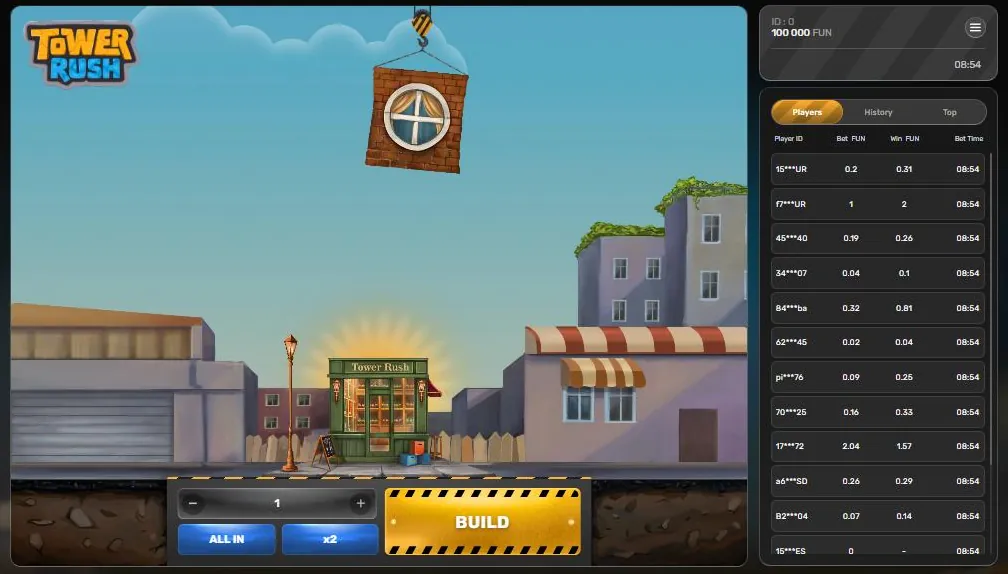
The game’s own interface includes controls such as BUILD and CASHOUT, along with a balance and player ID. Seeing those elements does not mean that the game has its own login system: the account and balance are associated with the hosting platform. The Tower Rush demo is a separate way to view the game using virtual Fun credits; it does not require real-money play.
04 · Account
Find the right Tower Rush game
If a platform lists many similarly named titles, check the developer and game type rather than relying on the words “tower rush” alone. Galaxsys Tower Rush is a Fast Games or Turbo Games crash-style building game, not a reel slot. The round involves choosing a bet, pressing BUILD and deciding whether to continue or cash out as floors are placed. A floor can collapse and end a round, and a successful floor does not always increase the current amount because its odds can be below x1.
The game’s public demo is available on desktop and mobile. In the demo, the displayed currency is Fun, and the rules describe demo limits. These are demo-only details and must not be read as real-money terms or as conditions offered by any platform. The game’s rules and features can vary by version, so check the rules displayed inside the version you open. Our how to play guide explains the round controls, while the bonus floors guide describes the special floor types.
A platform may place Tower Rush in a different menu or may not list it at all. Search its catalogue or use its support channel if the title is not visible. Do not assume that an absent game can be accessed by downloading an unofficial copy. If a third-party page claims to be the official Galaxsys login, compare its claims with the developer’s own page and do not submit credentials unless you have independently verified the platform address.
05 · Account
Protect your login and avoid fake links
Account security starts with the platform account because Tower Rush does not hold a separate account. A genuine-looking logo or the words “original”, “official” or “earn money APK” do not prove that a page is connected to Galaxsys. Third-party domains containing “tower rush” are not automatically official, and clones may imitate the name or graphics.
Use these precautions before and after signing in:
- Check the address each time. Look for misspellings, unexpected subdomains and extra words. HTTPS alone does not establish that a site is genuine or lawful.
- Use a unique password. If you suspect it has been exposed, change it on the platform and anywhere else you reused it. Change those other passwords as well.
- Enable two-factor authentication if the platform offers it. This adds a separate sign-in check, but it does not make a platform trustworthy or remove the need to verify the address. Never disclose an authentication code to a caller, chat contact or support impersonator.
- Do not follow urgent login messages. Messages claiming that an account will be closed unless you sign in immediately may be phishing. Open the platform using its verified address rather than the message link.
- Do not share credentials or remote access. A person claiming to fix a login problem should not need your password, one-time code or control of your device.
- Keep devices and browsers updated. Use a screen lock on mobile and avoid signing in on public or borrowed devices where possible.
- Log out on shared devices. Close the session, do not save the password, and check that the account page is no longer open. Closing a tab alone may not end an active session.
If you think you entered details on a fake login page, stop using that page. Change the affected password through the verified platform address, secure any other account where the same password was used, and contact the platform through its independently located support route. If the incident involves cyber fraud in India, use the National Cyber Crime Reporting Portal or call the stated cybercrime helpline.
06 · Account
Login problems and platform support
A failed Tower Rush login is usually an issue with the hosting platform account, the browser or the platform’s availability; the game itself does not issue passwords. The steps below are general checks, not a promise that an account can be restored. Platform procedures and decisions vary.
| What you see | What to check |
|---|---|
| Password is rejected | Confirm the correct platform address and account identifier. Check for typing errors and use only the platform’s password-reset route. |
| Verification does not arrive | Check the contact details entered and any permitted message filters. Follow the platform’s instructions, then contact support if the check remains pending. |
| Account is locked or restricted | Read the account notice and contact the platform using a verified support route. Do not create extra accounts to bypass a restriction. |
| Game is missing from the lobby | Search the listed Fast Games, Turbo Games or Crash sections. Availability and menu labels depend on the platform. |
| Game does not load | Refresh once, check the connection and try an updated browser. Do not download a file or extension from an unknown source to fix the issue. |
| Round or displayed balance seems wrong | Record the time and relevant on-screen details without sharing passwords or authentication codes. Contact the platform, since it operates the account and handles game access. |
When contacting support, explain the problem clearly and provide only the account details that the verified support channel requests. Never send a password or one-time code. If the support contact asks you to install remote-control software, move the conversation to an independently verified official channel before doing anything. Keep a record of the support reference or correspondence if the platform provides one.
Game rules state that an inactive round ends after one hour and a registered win is credited. They also state that a malfunction voids all pays and plays. These are game rules, not a guarantee that a platform will resolve every dispute in a particular way. Check the rules inside the exact game version and the platform’s account terms. If a result is disputed, report it through the platform’s process and include the relevant details; do not assume that a screenshot alone decides the outcome.
07 · Account
Tower Rush withdrawal: how does it work?
“Tower Rush withdrawal” or “withdrawal kaise kare” refers to a request made through the hosting platform, not through Galaxsys or the game interface. Tower Rush has no separate wallet or withdrawal page. The platform controls account balances, identity checks, payment methods, processing rules and any decision on a request.
For a general platform withdrawal, the usual account-navigation approach is:
- Sign in only at the platform’s verified website or official platform app.
- Open the account, wallet or payments area and find its withdrawal instructions. Menu wording varies.
- Read the platform’s eligibility, identity-check, payment-method and processing terms before submitting a request.
- Follow the platform’s stated process and use payment details that belong to you, as required by its terms.
- Keep the confirmation or reference information provided by the platform. If a request is pending or rejected, ask the platform’s verified support team for the reason and next steps.
This is not a guarantee that a withdrawal will be available, accepted or processed. Requirements and outcomes depend on the provider and the account. Do not pay an unexpected fee or share a password or authentication code in response to a message claiming to release a withdrawal. Verify any request by visiting the platform through an independently checked address. This guide does not list withdrawal amounts, timelines or payment options because they are not established for every platform.
There is also a legal issue that comes before any payment question. Under the India context set out below, real-money Tower Rush is an online money game covered by a complete ban. Do not treat a platform’s withdrawal instructions or account balance as confirmation that offering or using the service is lawful in India. If you have a concern about a transaction or suspected cyber fraud, seek appropriate official assistance.
08 · Account
Free Bet and Free Amount after registration
Free Bet and Free Amount are operator or platform bonus types mentioned in the game rules; they are not rewards issued by Tower Rush itself. Whether a platform displays an offer, who can receive it and what conditions apply are determined by that platform. An offer shown after registration is not guaranteed, and it should not be treated as a promise of winnings or a reason to provide more personal information.
Read the complete terms on the platform before accepting any promotion. Check what the offer applies to, whether there are eligibility conditions, how it may be used and what restrictions or expiry rules are stated. Do not rely on a message or advert that summarises only the headline. If the terms are unclear, ask the platform through its verified support channel or decline the offer.
The game does not provide a separate signup bonus. A platform promotion does not change the game’s rules, the account provider’s responsibilities or the legal position in India. Do not interpret “free” wording as evidence that a real-money service is lawful or risk-free.
09 · Account
Is Tower Rush real or fake, and is it legal in India?
The original Tower Rush is a Galaxsys game, but that does not make every site, app or login page using its name official. Similar names can belong to unrelated games, and a third-party site with Tower Rush in its domain is not thereby an official Galaxsys service. Check the developer’s page and the platform’s identity separately. More checks are outlined in Tower Rush real or fake: how to check.
The Promotion and Regulation of Online Gaming Act, 2025 (Act No. 32 of 2025), received assent on 22 August 2025 and applies across India, including to services operated from outside India. It imposes a complete ban on online money games, whether based on chance, skill or a mix, and prohibits offering, advertising and promotion of them. It also bars banks and payment systems from processing transactions for such games. Authorities can block access to unlawful platforms under the Information Technology Act, 2000.
The Promotion and Regulation of Online Gaming Rules, 2026 came into force on 1 May 2026, and an authority determines whether a game is an online money game. Playing Tower Rush for real money is an online money game under this law. The free demo using virtual Fun credits involves no money. This is a neutral explanation of the stated legal position, not individual legal advice. Do not infer that a platform is permitted to offer real-money play because it is accessible, has account verification or lists Galaxsys games. For further context, refer to our India legal status page and consult an appropriate legal professional for advice about a specific situation.
Tower Rush is for adults aged 18 and over. Age eligibility does not override the law. If gaming is causing distress or affecting your wellbeing, stop and seek support. India’s Tele MANAS national tele mental health helpline is available at 14416 or 1-800-891-4416; details are on the Ministry of Health and Family Welfare page.
FAQ
Questions about Tower Rush
How do I log in to Tower Rush?
Tower Rush has no separate account, so sign in through the gaming platform that hosts the Galaxsys game. Use the platform’s verified website or app and its own account credentials.
How do I register for Tower Rush in India?
Registration is completed with a third-party platform, not with Tower Rush or Galaxsys. The platform sets its verification steps, but real-money Tower Rush play is covered by the online money games ban described in this guide.
Is there an official Tower Rush app login or APK?
No official standalone Tower Rush APK was found in the facts for this guide. The HTML5 game runs in a mobile browser or inside a platform’s own app, and that platform’s login is separate from Galaxsys.
Tower Rush withdrawal kaise kare?
A withdrawal request, if available, is handled in the hosting platform’s account or payments area, not in Tower Rush. Its requirements depend on the platform, and real-money play in India is covered by the stated legal ban.
Is Tower Rush real or fake in India?
The original crash-style building game is made by Galaxsys, but similarly named games and third-party login pages may be unrelated. Real-money Tower Rush play is an online money game under the India legal position outlined above; the free demo uses virtual Fun credits.